muCommander(跨平台文件管理器) v1.6.2 中文绿色版
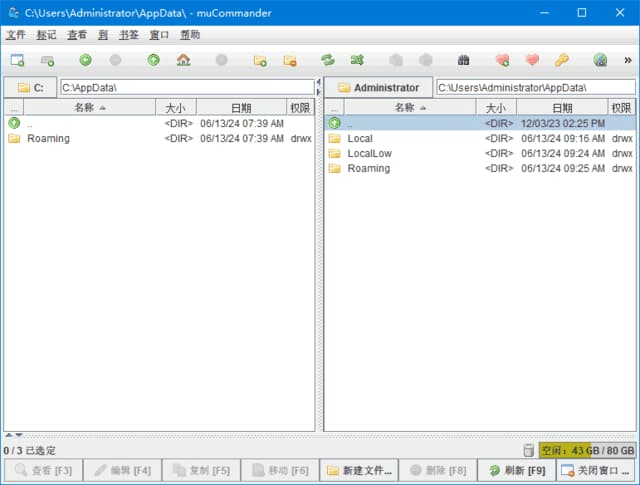
1. 跨平台支持:支持 Windows、Mac OS、Linux 等多个平台,无论您使用哪种操作系统,都可以安装和运行muCommander。
2. 自定义选项:支持多种自定义选项,包括主题、字体、颜色、图标等,满足用户各种需求。
3. 快捷键支持:支持多种快捷键,可以方便地运行程序和执行各种操作。
4. 插件支持:支持多种插件,例如图像插件、音频插件、压缩文件插件等,扩展软件的功能。
5. 开源免费:muCommander是开源软件,完全免费。
下载地址
<hrMicrosoft Yahei', MiSans, 'HarmonyOS Sans', 'Segoe UI', Roboto, 'Helvetica Neue', Arial, 'Noto Sans', sans-serif, 'Apple Color Emoji', 'Segoe UI Emoji', 'Segoe UI Symbol', 'Noto Color Emoji'; font-size: 16px; font-style: normal; font-variant-ligatures: normal; font-variant-caps: normal; font-weight: 400; letter-spacing: normal; orphans: 2; text-align: start; text-indent: 0px; text-transform: none; widows: 2; word-spacing: 0px; -webkit-text-stroke-width: 0px; white-space: normal; text-decoration-thickness: initial; text-decoration-style: initial; text-decoration-color: initial;" /> <pMicrosoft Yahei', MiSans, 'HarmonyOS Sans', 'Segoe UI', Roboto, 'Helvetica Neue', Arial, 'Noto Sans', sans-serif, 'Apple Color Emoji', 'Segoe UI Emoji', 'Segoe UI Symbol', 'Noto Color Emoji'; font-size: 16px; font-style: normal; font-variant-ligatures: normal; font-variant-caps: normal; font-weight: 400; letter-spacing: normal; orphans: 2; text-align: start; text-indent: 0px; text-transform: none; widows: 2; word-spacing: 0px; -webkit-text-stroke-width: 0px; white-space: normal; background-color: #ffffff; text-decoration-thickness: initial; text-decoration-style: initial; text-decoration-color: initial;">muCommander(跨平台文件管理器) v1.6.2 中文绿色版资源下载
- 夸克网盘
- 迅雷网盘
下载链接需要在页面上点击「获取下载链接」按钮获取,链接有时效,过期可重新生成。